What Are “Buffer Spaces” at Work? Here’s What HR Should Know
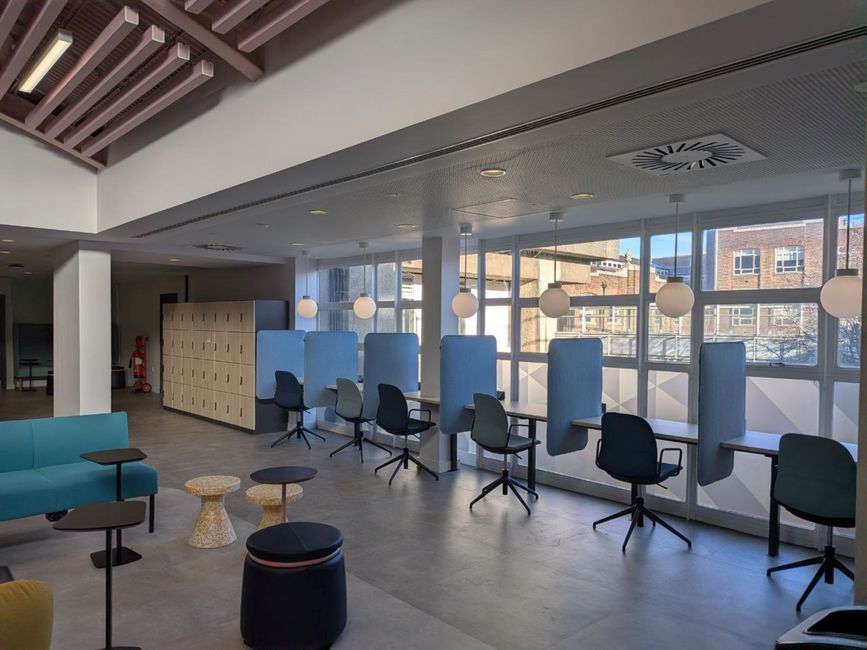
Buffer spaces are intentional gaps—physical, temporal, or procedural—designed to give employees breathing room between tasks, meetings, or high‑intensity activities. When used correctly, they protect focus, lower stress, and create a more predictable workflow. Below, HR professionals will find concrete definitions, real‑world examples, and step‑by‑step guidance for integrating buffer spaces into policies and workplace design.
1. Types of Buffer Spaces and Why They Matter
Understanding the three main categories helps HR decide where to start.
- Physical buffers: Quiet zones, phone booths, or dedicated “focus rooms” that separate concentration work from collaborative areas.
- Temporal buffers: Built‑in time blocks between meetings, email checks, or project phases that prevent back‑to‑back overload.
- Procedural buffers: Policies such as “no‑meeting days,” staggered start times, or mandatory break windows that create rhythm in the workday.
Each type addresses a specific pain point. Physical buffers reduce auditory distractions; temporal buffers protect mental energy; procedural buffers shape cultural expectations around uninterrupted work.

2. Identifying Gaps in Your Current Workflow
Before adding buffers, HR should diagnose where bottlenecks exist. Follow these steps:
- Map a typical day for a sample of roles (e.g., analyst, sales rep, HR coordinator). Note meeting frequency, email spikes, and task switches.
- Survey employees with targeted questions: “When do you feel most interrupted?” and “What time of day would you like a dedicated focus period?”
- Analyze data from calendar tools or time‑tracking software to spot back‑to‑back meetings or long stretches without breaks.
Common mistakes during this phase include:
- Relying solely on management intuition rather than employee feedback.
- Overlooking informal “quick syncs” that cumulatively eat up focus time.
- Assuming a one‑size‑fits‑all solution; different functions often need different buffer configurations.
3. Designing Physical Buffer Spaces
Physical buffers are tangible and often the easiest for HR to champion with facilities teams.
Key design principles
- Acoustic control: Use sound‑absorbing panels, white‑noise machines, or closed doors to minimize spillover.
- Clear signage: Mark rooms as “Focus Only – No Interruptions” to set expectations.
- Flexibility: Furnish with adjustable lighting and ergonomic chairs so the space can serve solo work, small brainstorming, or phone calls.
Implementation checklist
- Identify underused areas (e.g., spare conference rooms, hallway alcoves).
- Allocate a budget for acoustic treatments and furniture.
- Coordinate with IT to ensure Wi‑Fi coverage and power outlets.
- Launch a pilot with a single department and collect usage data.
- Refine based on feedback and roll out to additional locations.
Typical pitfalls:
- Creating too many “quiet rooms” that become hard to book.
- Neglecting to educate staff on proper etiquette, leading to accidental interruptions.
- Placing focus rooms near high‑traffic zones, which defeats the purpose.
4. Building Temporal Buffers Into Schedules
Temporal buffers protect mental bandwidth without requiring construction costs.
Practical scheduling tactics
- 15‑minute gaps after each meeting to allow note‑taking, task transition, or a quick reset.
- Block‑out focus time (e.g., 9:00‑11:00 am) on shared calendars, marked as “busy – focus.”
- Email‑free windows—for example, no email checks between 2:00‑3:00 pm.
Steps for HR to institutionalize these tactics
- Update the organization’s calendar policy to recommend a minimum 10‑minute buffer between scheduled events.
- Provide template calendar invites that automatically include buffer time.
- Communicate the change via a short video or FAQ that explains the productivity benefits.
- Encourage managers to model buffer usage in their own schedules.
- Track adoption rates through calendar analytics and adjust guidelines if conflicts arise.
Common errors:
- Mandating buffers without adjusting workload expectations, causing overload.
- Setting buffers that are too short to be effective (e.g., 2 minutes).
- Allowing “buffer time” to become a catch‑all for ad‑hoc tasks, eroding its purpose.
5. Embedding Procedural Buffers in Policy
Procedural buffers shape culture and reinforce the value of uninterrupted work.
Policy ideas that work
- No‑meeting days: Choose one day per month where no internal meetings are scheduled.
- Staggered break windows: Divide the workforce into groups that take lunch or short breaks at different times, reducing simultaneous interruptions.
- Task‑completion checkpoints: Require a brief “wrap‑up” note before moving to the next project phase, creating a mental buffer.
Roll‑out roadmap
- Draft a concise policy brief outlining the purpose and expected benefits.
- Run a pilot with a volunteer team to fine‑tune the language and logistics.
- Publish the final policy on the intranet and include it in onboarding materials.
- Train managers on how to protect their team’s buffers during peak periods.
- Review compliance quarterly and adjust based on employee surveys.
Typical missteps:
- Implementing a “no‑meeting day” without providing alternative communication channels, leading to delays.
- Failing to align procedural buffers with existing labor‑law break requirements.
- Neglecting to recognize that remote workers may need different buffer structures than on‑site staff.
6. Measuring the Impact of Buffer Spaces
HR needs evidence to sustain investment. Use both quantitative and qualitative metrics.
Quantitative indicators
- Decrease in average number of meetings per day per employee.
- Increase in self‑reported focus time (captured via quarterly pulse surveys).
- Reduction in overtime hours linked to task‑switching fatigue.
- Utilization rates of designated focus rooms (booking system data).
Qualitative feedback
- Open‑ended survey questions about perceived stress levels.
- Focus groups discussing how buffers affect collaboration and creativity.
- Manager anecdotes about improved project timelines.
When reporting results, present a balanced view: highlight gains, acknowledge areas needing adjustment, and outline next steps.
Conclusion
Buffer spaces—whether physical rooms, built‑in time gaps, or policy‑driven routines—are simple yet powerful tools for protecting employee focus and well‑being. By diagnosing current workflow gaps, designing appropriate buffers, and measuring outcomes, HR can create a more sustainable work environment without costly overhauls.
Takeaway: Start small—introduce a 15‑minute temporal buffer after meetings and a single quiet focus room. Track usage for one month, then expand based on real data.
Recommended courses
Keep going with structured practice and full-length preparation.



Ready to practice? Explore our courses.
Get started →